
Googlebook Laptops Are Here: The What and Why
For fifteen years, the Chromebook has been the laptop you bought when you wanted something simple, affordable, and hard to break. Now Google has built a laptop you might actually want to show off, and it’s asking for Windows-and-MacBook money to take one home.
Meet the Googlebook. After teasing the category in May, Google and five PC makers put the first Googlebook laptops up for pre-order on September 21. The machines reached US stores on October 4, with Canada, the UK, Ireland, France, Germany, and Australia following on October 5. Five models from Acer, ASUS, Dell, HP, and Lenovo are on shelves, priced from $899 to $1,299, and the early verdict is a fascinating mix of “wow, that hardware” and “okay, but what is this software, exactly?”
Here’s the full rundown: what a Googlebook is, why Google bothered, what happens to Chromebooks, who it’s really for, and what the first reviewers are saying.
What Is a Googlebook?
A Googlebook is two things at once: a new class of premium laptop and the operating system running it, called Googlebook OS. Google describes the platform as built around Gemini Intelligence, its branding for the latest AI features arriving on premium Android devices. Under the hood, it merges the Android tech stack with the desktop foundations of ChromeOS. Picture your Android phone growing a bigger body, a real keyboard, and a much larger screen.
The headline features lean hard on that phone connection and on Gemini:
- Magic Pointer: Wiggle the cursor and the laptop offers context-aware suggestions, like scheduling a meeting when you hover over a date.
- Create My Widget: Describe the dashboard you want in plain language and the system builds it from your Gmail, Calendar, and web data.
- Rambler: Turns rambling speech into cleaned-up text. (If that sounds familiar, it also debuted on the phones we covered in our Pixel 11 launch breakdown.)
- Continue On and Quick Access: Pick up tasks from your phone on the laptop’s taskbar, open supported phone apps, and browse your phone’s files without cables.
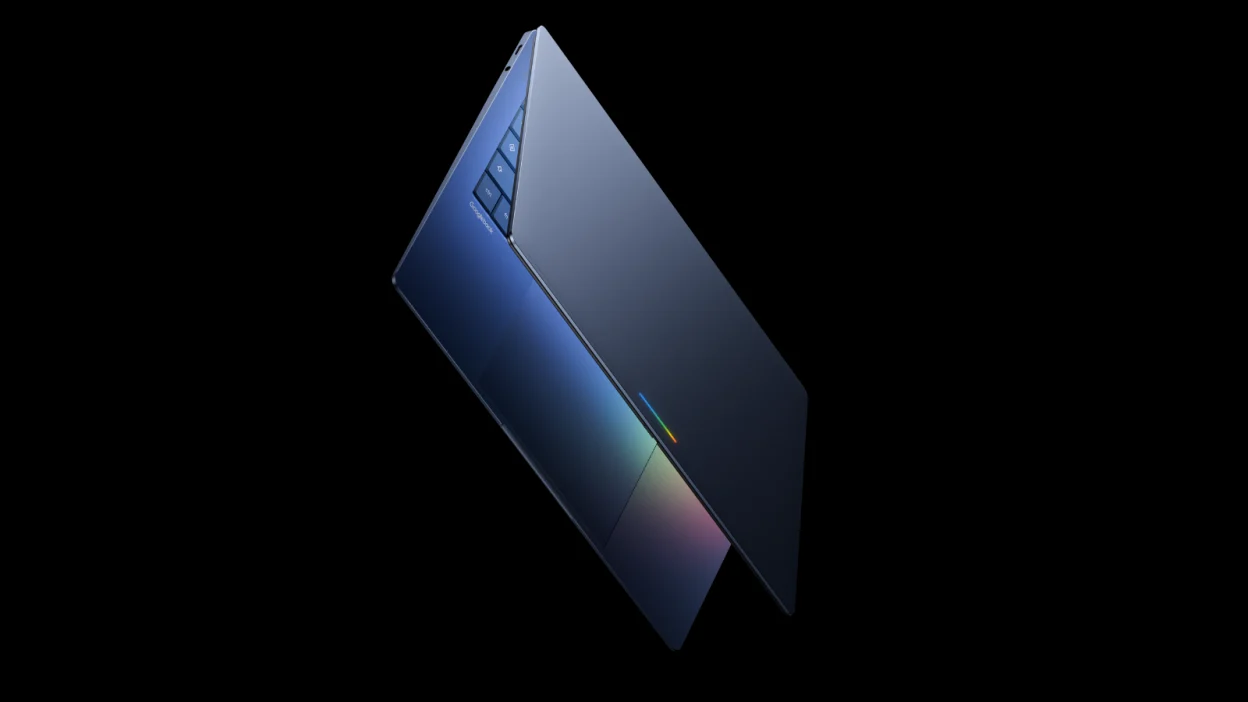
- Glowbar: A light strip on the lid that shows battery level, responds to Gemini, and lights up at startup. It’s the Googlebook’s signature party trick.
On the hardware side, every launch model ships with at least 16GB of RAM and 256GB of storage, a touchscreen (most are 2.8K OLED, with ASUS going up to 3K), and premium materials like aluminum, magnesium alloy, and carbon fiber. Buyers get a choice between Intel Core Ultra Series 3 and Qualcomm Snapdragon X Elite chips. Each purchase also includes 12 months of Google AI Pro (which bundles Gemini Advanced and 5TB of cloud storage), plus three months each of YouTube Premium and Adobe Photoshop. Google also says Googlebook OS will get feature updates for up to 10 years.
Meet the First Five Googlebooks
| Model | Starting Price | Chip | Display |
|---|---|---|---|
| Acer Googlebook 14 | $899 | Intel Core Ultra 5 or 7 | 14-inch 2.8K OLED touch |
| Dell XPS Googlebook | $1,199 | Snapdragon X Elite | 13.4-inch 2.5K touch |
| ASUS Googlebook 14 | $1,299 | Intel Core Ultra 5 or 7 | 14-inch 3K OLED touch |
| HP Googlebook 14 | $1,299 | Snapdragon X Elite | 14-inch 2.8K OLED touch |
| Lenovo Googlebook 15 | $1,299 | Intel Core Ultra 5 | 15.3-inch 2.8K OLED touch |
Acer’s model is the only convertible in the group and the cheapest. ASUS leans into portability, Lenovo goes big with a 15-inch screen, and Dell makes history as its first XPS laptop to ship without Windows pre-installed.
Why Google Built It
Chromebooks have thrived for 15 years in classrooms and on budget shelves, but they’ve rarely competed at the premium end. Sameer Samat, the Google president overseeing Android, told Bloomberg there’s an opportunity to bring more innovation back to laptops, especially at the high end. Google has framed Googlebook as a convergence of Android and ChromeOS.
The strategy is easier to see when you follow the AI thread. Building Gemini into the core of the operating system, rather than bolting it on as an app, lets Google offer more consumer-facing AI than Windows or macOS notebooks currently do. It’s the same all-in energy behind other big AI pivots we’ve tracked, like Mozilla Firefox’s AI pivot, which split its community right down the middle.
Interestingly, PCWorld argues Googlebooks feel less AI-first than phone-first. That tracks with Google’s own pitch: the platform’s first audience is the Android community, and the best-demoed tricks involve your phone doing laptop things.
Googlebook vs. Chromebook: Replacement or Roommate?
Short answer: roommate now, successor later.
Google says current Chromebooks aren’t going anywhere overnight. According to 9to5Google, ChromeOS devices keep receiving regular updates and security patches through mid-2034, existing Chrome Enterprise and Education licenses keep their management features, and Chromebooks remain available for school and business deployments today. “Many” newer commercial Chromebooks, specifically those with a 10-year update policy running past 2034, will be eligible to move to Googlebook OS.
The fine print is where it gets murky. Google hasn’t named which models qualify or how the upgrade will work, and Googlebooks and migrated Chromebooks will use a new licensing structure whose terms haven’t been published. Tom’s Hardware also reported that Googlebook management tools for IT admins don’t arrive until the back half of 2027, so schools and enterprises are staying on Chromebooks for the foreseeable future.
Early Impressions: Great Hardware, Software Still Proving Itself
Reviewers have mostly been charmed by the hardware. In its hands-on with all five, 9to5Google called the Dell XPS and HP models the most impressive of the bunch, said every unit felt snappy, and credited Android’s touch-first heritage for making the touchscreens feel more natural than they do on Windows or ChromeOS. The Gadgeteer’s first look at the ASUS model praised its matte OLED display, keyboard, and haptic touchpad, and across the lineup, reviewers noted consistent 120Hz panels.
The software is a different story, and it’s where the caution creeps in:
- Chrome Unboxed stressed that this is a genuinely new operating system, not a Chromebook refresh, and that there’s plenty of work left to do.
- MobileSyrup’s first thoughts on the ASUS model summed it up as great hardware with underwhelming software, flagged an app problem, and said it’s too early to tell whether Googlebook OS helps or hinders.
- PCWorld declined to crown a single standout after just a few hours with the lineup.
- No publication has yet released full independent benchmarks, so performance claims are still mostly Google’s.
Pricing is the other recurring pinch point. With the cheapest model at $899, Googlebooks sit in a very different tier from the Chromebooks most people know.
Who Is the Googlebook For?
Google’s own framing puts Android users first, and that’s the clearest read of the target market:
- Android loyalists who want a laptop that treats their phone as part of the system rather than an afterthought.
- Premium laptop shoppers comfortable spending $899 to $1,299 for OLED screens and premium builds.
- Creators on the go, with apps like CapCut and Figma shown running on Googlebook OS and Adobe Premiere reportedly on the way.
- Gamers, courtesy of Google’s Level Up program and a year of Nvidia GeForce Now with each laptop.
- Developers and tinkerers, since Googlebook OS includes a full Linux terminal for command-line tools.
Who it isn’t for, at least yet: schools and IT departments (they’re staying on Chromebooks), budget buyers, and anyone who needs full Windows or macOS desktop software. Googlebook is Android-based, so think apps and the web rather than traditional desktop programs.
PROS
- Premium builds with up to 2.8K OLED touchscreens across the lineup
- Tight phone integration through Continue On, Quick Access, and phone apps on the laptop
- 16GB RAM and 256GB storage as the baseline
- Generous bundle: a year of Google AI Pro and GeForce Now, plus a Photoshop trial
- Up to 10 years of feature updates
CONS
- Starts at $899, far above typical Chromebook pricing
- Googlebook OS is brand new, and early testers flagged app availability and maturity
- No full independent benchmarks yet
- Chromebook-to-Googlebook upgrade details and licensing are still vague
- Enterprise management tools aren’t due until late 2027
FAQ
What is a Googlebook?
A Googlebook is a premium laptop that runs Googlebook OS, a new operating system that merges the Android tech stack with ChromeOS foundations and is built around Gemini Intelligence features.
How much do Googlebooks cost?
Prices run from $899 for the Acer Googlebook 14 up to $1,299 for the ASUS, HP, and Lenovo models. The Dell XPS Googlebook sits in the middle at $1,199.
When did Googlebooks come out?
Pre-orders opened September 21, and the laptops launched in the US on October 4, followed by Canada, the UK, Ireland, France, Germany, and Australia on October 5.
Is the Googlebook replacing the Chromebook?
Eventually, but not right away. Google says ChromeOS will keep receiving updates through mid-2034, and many newer commercial Chromebooks will be able to move to Googlebook OS.
Can a Googlebook run Windows apps?
Not natively. Googlebook OS is Android-based, so expect Android apps from Google Play and the Chrome browser rather than traditional Windows desktop software.
Which Googlebook should I buy?
It’s too early for a definitive pick. 9to5Google favored the Dell XPS and HP models, while Acer’s is the cheapest and the only convertible.
